


How to use Heading Tags to Enhance Your Website SEO Part 1
Filed in All About Blogging, Business Tips, Website Design Tips

If you’re here you’ve probably been feeling pulled to start learning SEO for your website! But my guess is you’re feeling a little intimidated by the “techy-ness” of it all. My other guess is you’re here because you feel like you “have” to be…not because you’re pumped up about meta descriptions, h tags, or Alt text.
(But if you are, hey, who am I to rain on your parade!)
While it might not be the most riveting topic in the entrepreneur’s space, SEO is a powerful tool we can wield to truly reach our ideal clients. It’s how we tell Google (and other search engines) “hey, here’s this thing I’m doing. Here’s what I talk about most often, here’s what I offer, and here’s who I do it for”
In this three part series we’ll be simplifying all of the SEO jargon that makes your head spin. You’ll walk away with crystal clear steps to start implementing SEO practices in your website copy, on your website pages, and in your content.
Let’s get into it!
WHAT ARE H TAGS?
Perhaps you’ve seen the symbols: <h1>, <h2>, <h3> before while working through your website or any word document editor for that matter. (And if those symbols are completely foreiqgn to you…that is A-okay!)
These are what we call “H Tags” or “Heading Tags.”
Headings are used to separate information on a page. This makes it easier for the reader to take in all of the information by breaking it up into sections. It also helps Google understand what the main ideas on that page are.
This is where SEO comes in. The headings on any website page, whether it’s your home, about, or a blog post, highlight the most important things the reader should take away.
Think of H Tags as sticky labels that we can apply to each heading. (It may help to visualize a gold, silver, and bronze sticky label to help you remember the importance of each).
Now what about the numbers? Let’s take a closer look at that!
BREAKING IT DOWN
H Tags aren’t something your reader will be able to see. They are something you set in your backend to communicate with Google.
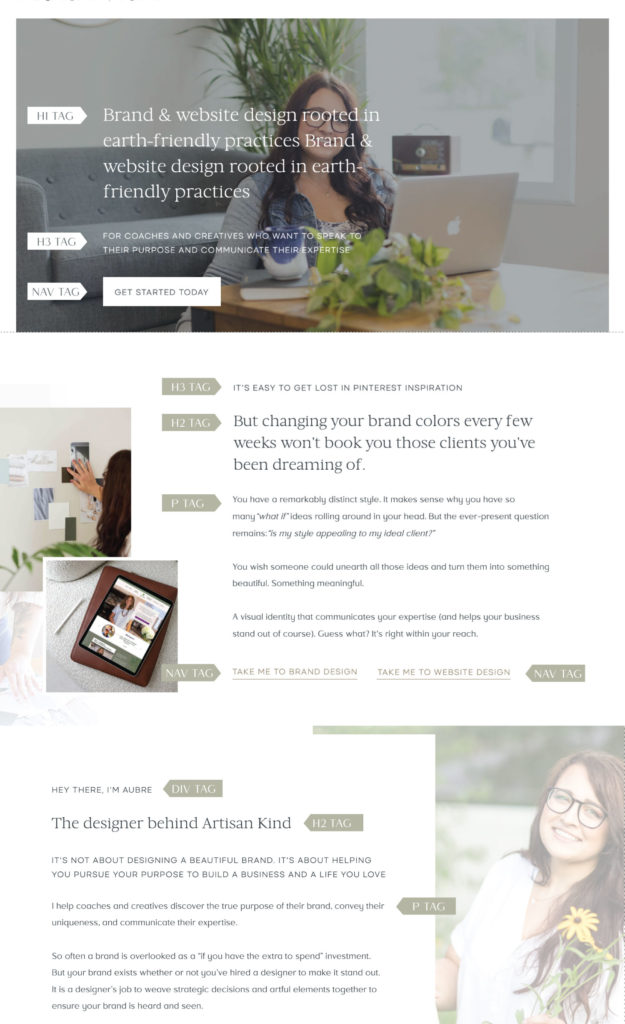
H Tags have a hierarchy of importance in descending order. H1 being the most important (a gold sticky label if you will), H2 being secondary (a silver sticky label) and so on.
H1: The Most Important Thing Your Reader And Google Should Know About That Page.
- Only used ONCE per page ( because we want to tell Google “I want you to look at this heading first, this is the main idea.”)
- Usually at or near the top of the website page.
- The heading assigned an H1 tag should have a relevant keyword that someone might search for to land on this page.
For example:
The heading “Asheville North Carolina Holistic Health Coach for Women” will likely be at the top of a home page. This heading should be assigned an H1 tag because it contains the main idea of the page. It also uses location and industry keywords.
Someone very well might search for “holistic health in Asheville North Carolina.” With that H1 tag applied to it, Google is ready to recommend that page to anyone who searches for it.
H2 And H3: Smaller Ideas That Help Break The Page Up.
- Can be used MULTIPLE times per page.
- H2 is assigned to headings that are more relevant to the reader and Google than H3. (But not as important as H1).
- H3 tags are assigned to the smallest points on a page.
H TAG SIZES.
In addition to a hierarchy of importance, H tags also have a hierarchy of font size in descending order.
The heading given and H1 tag will be the largest font on the page. Headings with H2 tags will be a bit smaller and so on. The font you use for your body copy (the section you’re reading right now) will be the smallest of course. And guess what, there’s a special tag for this kind of text as well!
OTHER TAGS TO KNOW
Headings aren’t the only bits of text that require tags! You will also run into tags that look like <p>, <div>, and <nav>.
- P tags stand for “paragraph.” This tag can be applied to any bit of body copy.
- Div tags stand for divide. These are applied to headings that are not important for Google. For example:
Text like “Hey there” that’s placed before your name on your about page would be given a <div> tag. While these bits of witty or on-brand copy are great for connecting with your audience, Google doesn’t need to pay attention to it.
- Nav tags stand for “navigation.” These will be applied to any links on your page. Think about links in your menu or on buttons.
HOW TO SET THEM
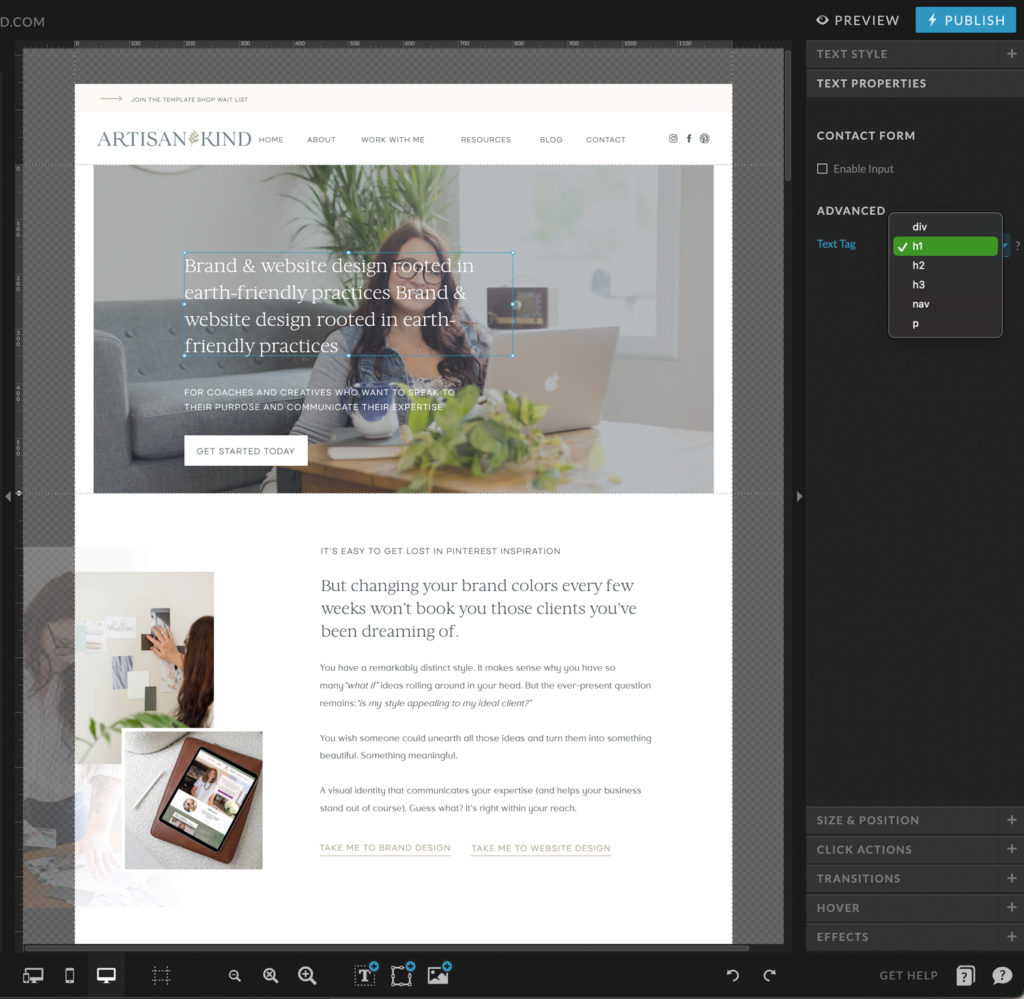
Applying H tags and the additional ones we mentioned is very easy in the backend of your website. For Showit:
- Login into your account
- Click on any text box you want to apply a tag to
- Click “text properties”
- Click “Advanced properties”
- Assign the relevant H1, H2, H3, P, Div, or Nav tag
Now that you know how to set your tags for improved SEO on your website, it’s time to learn about page titles and meta descriptions (it’s not as scary as it sounds!).
Head on over to part two of this blog series to read the post.

Aubre Walther is the founder of Artisan Kind, a website and brand design studio specializing in Showit websites that feel true to who you are. As an official Showit Design Partner, she helps service-based businesses like coaches, wellness professionals, and consultants build websites that attract right-fit clients through authentic design. Working from her 100% solar-powered studio in Eau Claire, Wisconsin, she creates clean, intentional websites that make potential clients feel an instant sense of connection. When she’s not designing, you’ll find Aubre tending to her cats and celebrating the small wins.
Explore Showit templates and design services at artisankind.com.
Leave a Reply
Small business and website tips, branding advice, client projects, and occasional tips that help you build a life you love while growing a more joy-filled business.
Join the Email Community



A $250 value
Written recap of review for easy reference
Pinpoint common SEO mistakes keeping your website hidden from Google and AI searches
Uncover missed opportunities that could be costing you bookings
Join me for a 30-minute website review. Walk away with an actionable plan to transform the website you already have into an asset that helps grows your business.



[…] Once you feel like you’ve got a handle on your title tags, meta descriptions (and H tags from our previous post, part one) then you can read the third and final post in this SEO series: how to set up image titles and […]
[…] remember is you don’t need to do everything at once. Start small. Focus on one SEO task such as H tags, or Meta descriptions, or alt text. As we always say, there’s no pressure to be perfect with […]
[…] I started my first business my focuses were way out of priority. I was preoccupied with SEO before I even had a solid contract in place or even one good headshot. SEO is important, but it […]